Updated about 12 yrs, 7 mths ago (November 22, 2013). Know a better answer? Let me know!
How to fix Windows 7 bug where “thumbs.db” prevents renaming or deleting most recently viewed folder
Sick of having Windows 7 refuse to move, rename or delete folders because something has gone and locked the thumbs.db file while it caches thumbnails or something similar?
You receive an error “The action can’t be completed because the folder or a file in it is open in another program. Close the file or folder and try again” and it mentions Thumbs.db. It probably looks something similar to the below:
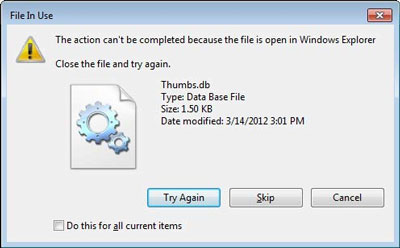
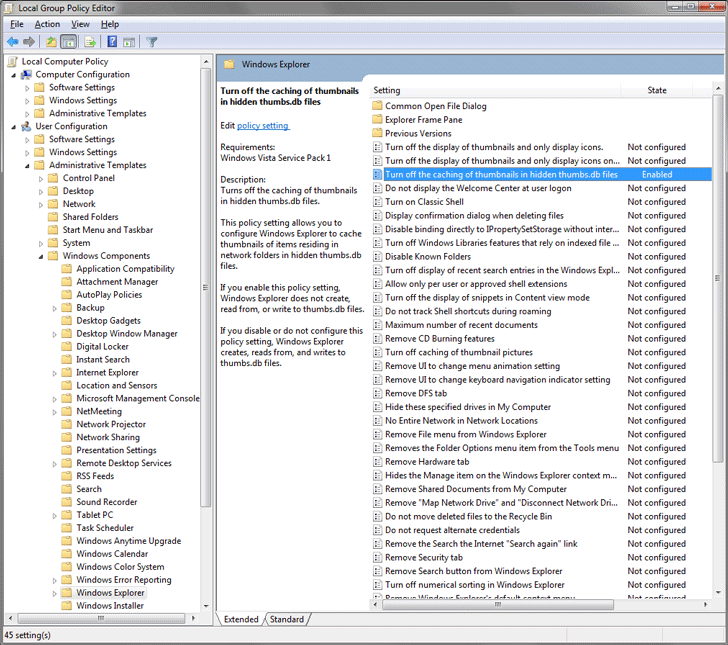
To fix this, disable the caching of thumbnails in hidden thumbs.db files via the Group Policy Editor as below:
- Run gpedit.msc
- Navigate to:
(in Windows 7) User Configuration\Administrative Templates\Windows Components\Windows Explorer
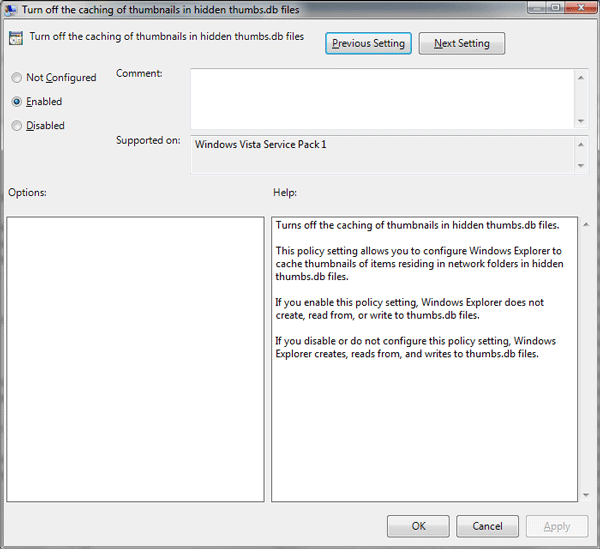
(in Windows 8) User Configuration\Administrative Templates\Windows Components\File Explorer - Set “Turn off the caching of thumbnails in hidden thumbs.db files” to Enable.
- You may need to log off or force group policy to update before this takes effect, I am not sure.
To force group policy to update, run gpupdate /force
Or see the following Microsoft KB article which contains a Fix It to do this for you (and instructions on how to do it via the registry if you have a version of Windows 7 without the Group Policy Editor).
More Information
For more information:
- See the following Microsoft KB article.
- Or see WINDOWS 7 BUG: Explorer Locks "thumbs.db" in most recently viewed folder
Updated about 12 yrs, 7 mths ago (November 22, 2013). Know a better answer? Let me know!
Related categories .
User submitted comments:
Anusha, about 13 yrs, 8 mths ago
Monday October 29, 2012 1:14 PM
Thank you very much. Worked for Windows 8 as well. Just have to select "File Explorer" instead of "Windows Explorer" in Group Policy Editor. <3
Ned, about 13 yrs, 8 mths ago
Monday October 29, 2012 1:17 PM
Good to know. Also interesting to see they still haven’t fixed this annoying problem with Windows 8.
Niamh, about 13 yrs, 8 mths ago
Thursday November 1, 2012 11:10 AM
Thanks. That has been driving me crazy for so long - it's great to finally see the back of it.
revaaron, about 13 yrs, 6 mths ago
Monday December 17, 2012 1:34 AM
in win8 it is
User Configuration\Administrative Templates\Windows Components\File Explorer
Ned, about 13 yrs, 6 mths ago
Tuesday December 18, 2012 12:55 AM
Thanks, I have updated the article.
CecilyT, about 13 yrs, 5 mths ago
Sunday January 27, 2013 4:24 AM
What do you do if you have Win8 Home edition and no gpeditor?
Hannnah, about 13 yrs, 4 mths ago
Monday March 4, 2013 8:58 AM
I tried running the "gpedit.msc" process and it didn't work. Is there anything I could do as an alternative? I have Windows 8 on my laptop. Thanks!
Sofia, about 13 yrs, 3 mths ago
Tuesday April 9, 2013 9:39 PM
Victory! Thank you so much and I am glad I found this page! I have been suffering for months renaming and deleting folders.
Cathy, about 13 yrs, 2 mths ago
Monday May 6, 2013 9:53 PM
Thanks!
Rafi, about 12 yrs, 11 mths ago
Thursday July 25, 2013 10:55 AM
This is not a fix, you just turning off the option. What if I want to see preview and still able to delete/rename folders with ease. It's a windows bug.
Ned, about 12 yrs, 11 mths ago
Thursday July 25, 2013 10:53 PM
Thumbnail preview will still work.
Paurian, about 12 yrs, 11 mths ago
Tuesday July 30, 2013 3:02 PM
Thanks! This thing has been pestering me for months!
LaFouine94, about 12 yrs, 9 mths ago
Thursday October 3, 2013 9:04 PM
Yes, but it will be longer to preview, since it is not cached.
Sam, about 12 yrs, 9 mths ago
Thursday October 10, 2013 12:30 PM
I've been having this problem repeatedly since we upgraded to Windows 7. Previously had XP and did not experience this problem at all. Why, and what is different about Windows 7? Just curious. Thanks for this fix, I will be trying it out.
soulcatcher, about 12 yrs, 7 mths ago
Friday November 15, 2013 4:41 PM
From observation I've determined only one thumbs.db can be locked. Create a new text file in a different directory than the one you want to rename/unlock.
Rogier, about 12 yrs, 7 mths ago
Friday November 22, 2013 12:47 PM
Little typo: "gpudate /force" should be "gpupdate /force"
Ned, about 12 yrs, 7 mths ago
Friday November 22, 2013 12:51 PM
Thanks. I have fixed the typo.
Cats, about 12 yrs, 6 mths ago
Tuesday December 17, 2013 10:33 PM
This worked well.
Is there an option to disable it only on network connections?
Jerry, about 12 yrs, 6 mths ago
Friday December 20, 2013 2:09 PM
Thanks. Worked like a charm. Nice and easy... :)
Nancy, about 12 yrs, 5 mths ago
Wednesday January 15, 2014 1:23 PM
I do not have the ability to do this as I receive a file from a vendor containing the thumbs.db file and I have no control over their system. Is there another solution?
Ned, about 12 yrs, 5 mths ago
Wednesday January 15, 2014 1:25 PM
Receiving something from a vendor containing Thumbs.db will make no difference to this solution. If your computer does not write them, then it won't lock them.
Thomaz, about 11 yrs, 11 mths ago
Wednesday July 30, 2014 5:18 PM
Muito obrigado;
By Brazil
Momentum, about 11 yrs, 9 mths ago
Friday September 19, 2014 8:19 PM
Found it! thx. Pffff annoying!!! :) its fixed now. Thanks again.!
David, about 11 yrs, 9 mths ago
Wednesday October 8, 2014 1:24 PM
Didn't work. Tried enabling, tried /force. Tried creating a text file in a different folder as per a reader comment. Wit's end.
Ned, about 11 yrs, 9 mths ago
Wednesday October 8, 2014 1:28 PM
If you are having trouble deleting a folder, then probably something else has opened that folder, or a file in it.
Paul, about 11 yrs, 5 mths ago
Thursday January 29, 2015 11:54 AM
Useful worked perfectly for W7 x64 pro
praveen, about 11 yrs, 3 mths ago
Sunday April 5, 2015 8:34 AM
I cannot open my folders in all drives
Getting that cant open application thumbs .db files are missing. Reinstalling may fix the problem.
Pls tel me a solution
Jerry Hewett, about 11 yrs, 4 days ago
Monday July 6, 2015 3:04 PM
The way to fix this problem is just to turn off Thumbs.db altogether.
reg add "HKLM\SOFTWARE\Microsoft\Windows\CurrentVersion\Policies\Explorer" /v NoThumbnailCache /d 0x1 /t REG_DWORD /f
reg add "HKLM\SOFTWARE\Policies\Microsoft\Windows\Explorer" /v DisableThumbsDBOnNetworkFolders /d 0x1 /t REG_DWORD /f
reg add "HKCU\SOFTWARE\Microsoft\Windows\CurrentVersion\Policies\Explorer" /v NoThumbnailCache /d 0x1 /t REG_DWORD /f
reg add "HKCU\SOFTWARE\Policies\Microsoft\Windows\Explorer" /v DisableThumbsDBOnNetworkFolders /d 0x1 /t REG_DWORD /f
ascool_asice, about 10 yrs, 9 mths ago
Friday September 11, 2015 7:37 AM
Wow thanks for this... it seemed to have resolved all my frustrations with this problem
chuck, about 10 yrs, 6 mths ago
Tuesday December 29, 2015 8:52 PM
Why we have to do this is beyond me. It's the dumbest setting to have on by default.
john smith, about 10 yrs, 5 mths ago
Friday January 15, 2016 2:29 PM
I'm on a university computer where I don't have access to Group Policy, Command Prompt, etc. What can I do?
Comment on this article (no HTML, max 1200 characters):
Vitosal, about 13 yrs, 10 mths ago
Saturday August 11, 2012 8:22 AM
Thanks Bro, worked like a charm :-)